Step_Around
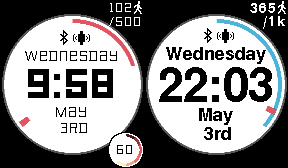
A simple clear watchface. Daily steps circle around the outside. A red line will show until the daily average is reached, then it turns blue. Your step goal can be set in the configuration - the average (indicated by a small red marker) is automatically calculated. For the PT the step goal is top right below the tiny walker image (in 1k increments) and daily steps are above - both of these match up with the outer ring. The lowest goal value that can be displayed is 500 (and a max of 20k)
Configuration also has,
- choice of different font styles
- battery status on/off
- HR on/off - for the P2 if you want it off permanently adjust via your app health settings
- BT and hourly vibrations
- supports 12/24hr modes
- icon to show quiet time status (to the left of the BT icon)
Screenshots