This Then That
Initiate IFTTT triggers from your Pebble using the microphone.
HOW TO USE
===========
Start the app and say [trigger] [value]:
EXAMPLE
=========
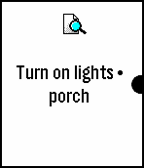
"Turn lights off" .
"Turn thermostat, 70" .
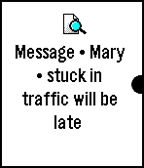
"Send text Mary stuck in traffic will be late" .
"Remind me meeting at 4 pm" .
Other supported formats are:
[trigger] [key] [value 1] [value 2] [value 3]
FEATURES
=========
- Supports multiple keys
- Set triggers that fire without confirmation
- Jump into dictation mode when opening from quick launch and exit app automatically
- Word lookup and replace (useful for converting names to email addresses)
- Vibration on success/failure so you can speak without looking
- Clean interface and glanceable icons
- Event is recorded on your Pebble timeline (optional)
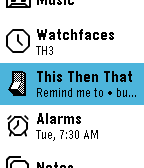
- Last command saved and visible in app launcher
IFTTT.com
========
To use this app, you need to "connect" your account to the "IF Maker" channel on the IFTTT website. Then copy your maker "Key" to the app in the app settings page.
You also need to create some "recipes" on the IFTTT website that use "Maker" as the trigger and give it a name. Then add the same name in the app settings page so that the app can recognize it.
With IFTTT you can controls things like Facebook, Twitter, WeMo, Nest, OneNote, Blogger, Dropbox, Evernote, Gmail, Spotify, Wordpress, etc.
This app does not require your IFTTT password and cannot access your IFTTT account details. Supports pmkey.xyz.
This app is NOT affiliated with IFTTT Inc.
FEEDBACK
========
Share your feedback on the Pebble forums here:
http://tinyurl.com/tttpbl
Screenshots